Your website still works, in the sense that people can open it, the contact form sends somewhere, and the headshot from four years ago is still up. However, your practice has changed over the last few years; you've grown not only as a clinician, but as a business. You hired clinicians, narrowed your niche, opened a second office, stopped taking insurance or started taking insurance, added medication management or therapy groups to your offers, and the website doesn't outline any of these changes for your ideal client to find.
That is when a therapist website redesign starts to make sense, and it has very little to do with being bored of the colors. As a therapist who runs a marketing agency for clinicians, I spend a lot of consult calls telling practice owners they don't need the website they came to buy. The signs below are what I use to tell whether a practice has outgrown its site or just needs a focused fix.
Key Takeaways
· A redesign makes sense when the site's structure no longer matches the practice, and a refresh is enough when the structure still works, but the copy, photos, or a few pages feel wrong.
· The clearest signs are a niche or service model that changed, a team or second location the site still treats as a solo practice, a consult call that starts with ten minutes of explaining what the site should have said, and routine updates that have become a project every time.
· Before paying for a rebuild, fix the obvious problems first and see whether the site still feels wrong afterward.
· Keep the pages, URLs, and blog posts that already bring in traffic, because you paid for those with years of search history.
· A redesign hurts SEO when you change URLs without redirects and delete useful pages, but it keeps your rankings intact when you map the move before launch.
How do I know if my therapist website needs a redesign?
Your website needs a redesign when it's organized around an outdated version of your private practice and clinical work.
Writing new copy in the old structure still describes the wrong business.
Your website needs a design refresh when the navigation, page structure, and platform still fit, but the copy, visuals, SEO, or a few pages feel wrong.
That distinction decides how much you spend, because a redesign is not automatically the answer every time you get tired of looking at your homepage. I have had plenty of practice owners come to me convinced they need to start over, and after twenty minutes it is clear the architecture is fine, and the copy was written for insurance clients they no longer see. Rewriting five pages solves that. Other times the practice has three service lines and a team, and the site still has one About page and one Services page, and no amount of rewriting makes that structure hold.
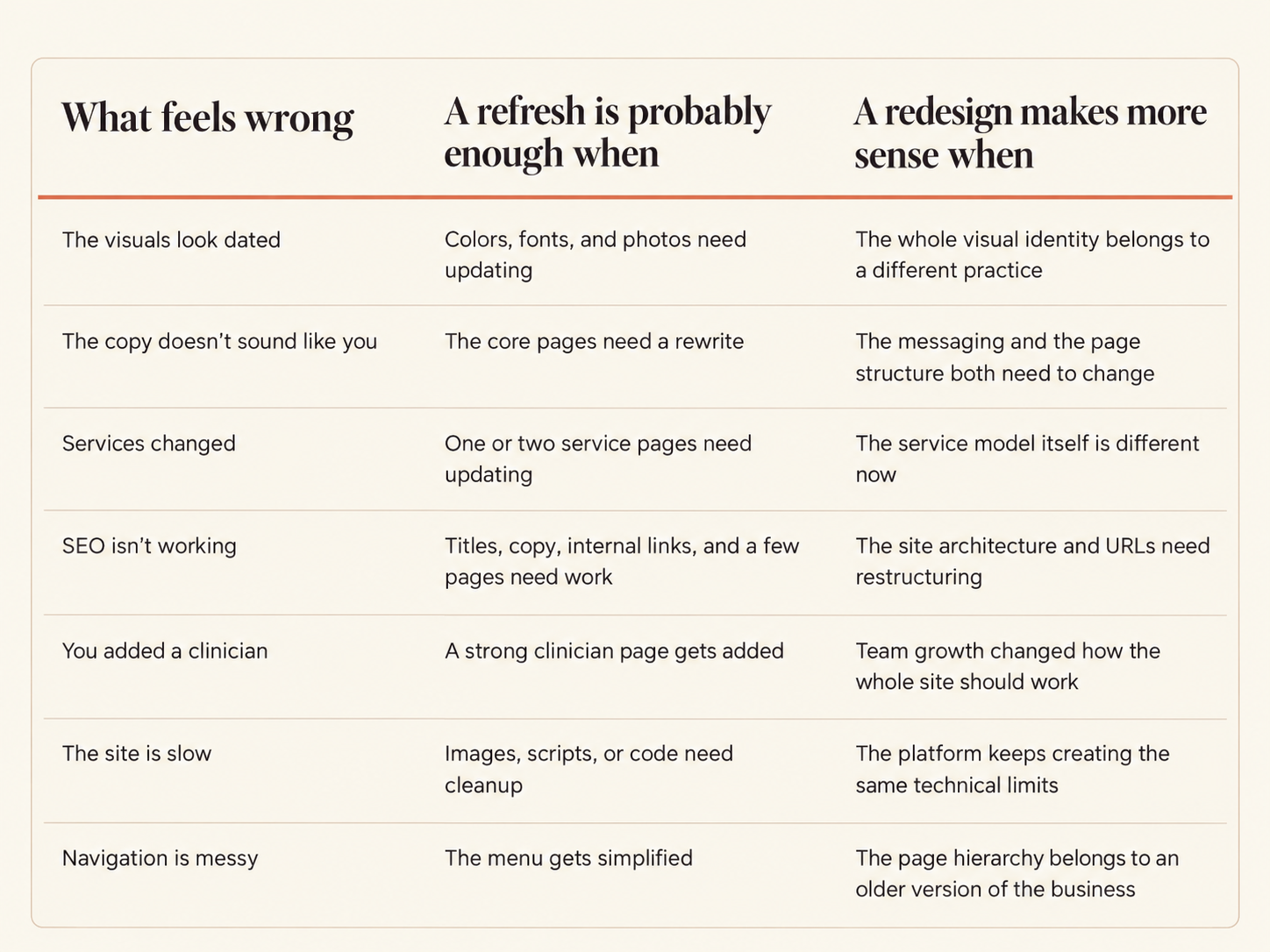
Refresh vs redesign: the right decision depends on whether the structure still fits the practice.
At The Passive Practice, this is why we offer more than one website option. The Website Upgrade is for an existing site that needs better copy, design, and SEO, and the Semi-Custom and Custom Website options are for practices that need the structure rebuilt. You don't need the biggest package; you need the amount of work that matches the problem you actually have, and I would rather tell you that on a call than sell you a rebuild.
What are common signs that a therapy practice website is outdated?
A therapy practice website is outdated when the niche or services on it no longer match what you offer, when a team or second location is still presented as a solo practice, when visitors can't find the next step, when the mobile version is hard to use, when the office feels more established than the site does, or when every routine update has become a project. Here are the nine signs I look for, in the order I usually find them.
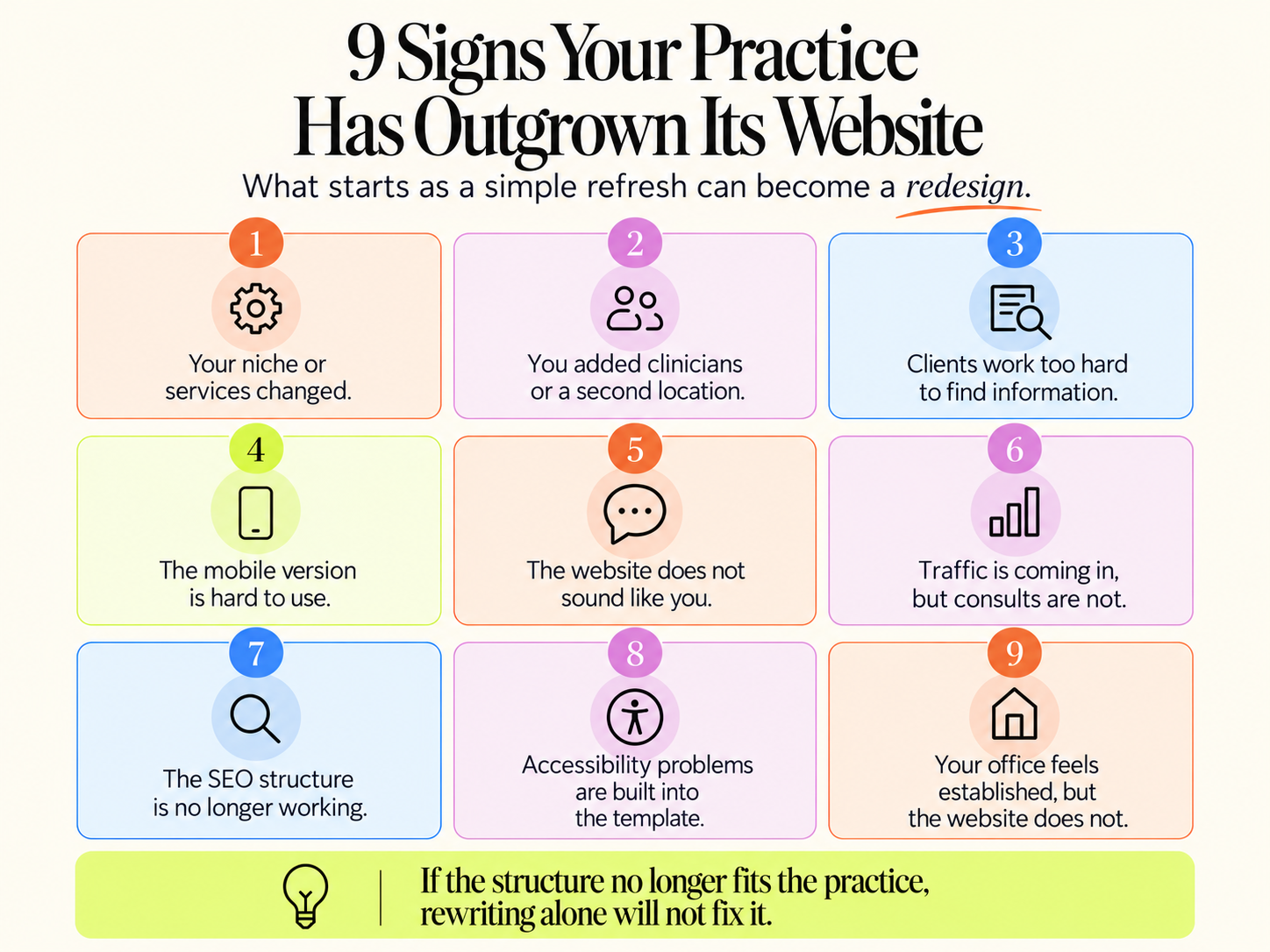
1. Your niche or services have changed
When you first wrote the copy for your website, you had not yet niched down to a specific ideal client or service. You wrote your content to answer the standard questions you thought a potential patient might have, like your availability or fees.
Now you specialize in perinatal mental health, OCD, or couples after an affair. Or you're a PMHNP who added medication management to a therapy-only practice, or your solo practice became a clinic with six service lines.
The private practice has grown, but the website didn't, so the site introduces an older version of what your practice offers and who it serves. When your ideal client does find you, it doesn't have the information they need to decide whether you are the right fit, because it doesn’t even include all the details about your practice and the value you offer.
If one service changed, update the page and move on. If the niche changed the entire way the practice needs to introduce itself, you are looking at the homepage messaging, the navigation, the service pages, the clinician pages, the calls to action, and which searches each page is supposed to answer, and that is a structural change rather than a copy edit.
2. You added clinicians or a second location, but your website still represents a solo practice
When you started your practice, you were a solo clinician, and the website represented who you were as a clinician, your niche, and the ideal client you served. Then three clinicians joined, and another office location opened. Still, you are starting to notice that it is getting more difficult to fill everyone’s caseloads, and most people are unaware you even have a second location. Every inquiry still asks for you as the founding clinician by name.
That isn't necessarily a clinician problem. Often, the website never gave visitors and potential patients the information they needed to determine if another clinician might be a better fit, or even that there were other therapists available to provide them with the support they are looking for.
When I do free website and SEO audits, the most common mistake I see is that new bios and locations were added to a layout built for one person instead of a structure that supports a team.
A clinician page that works tells a prospective client who that clinician works with, which concerns they focus on, how they talk about the work, their relevant training, where they practice, whether they offer telehealth or in-person sessions, and how to get started. Clients aren't comparing resumes; they are trying to figure out whether this person understands what they are dealing with before committing to a first session. If the practice has several locations, the site also has to make it obvious which clinicians work where and which services are available at each office, without making the visitor piece it together from the footer.
3. Potential patients have to work too hard to find information about how you can support them
A person looking for therapy is not arriving on your site curious about how you organized it. She wants to know what you offer, whether you work with someone like her, where you are, who she would see, and what happens next. When those answers are hard to find, she does the organizational work the site should have done for her, and many people close the tab instead.
The most common mistakes I see on websites are giant menus, vague navigation labels, important services buried three clicks deep, several pages saying nearly the same thing, clinician bios disconnected from the specialties, and four different booking paths. The redesign question is whether you can simplify the navigation or whether the whole site is organized around a business that no longer exists. If it is the second one, rearranging menu labels won't get you there.
If you want a better understanding of where your website might be losing potential patients, get one of my FREE WEBSITE AND SEO AUDITS.
4. The mobile version is not optimized and is difficult to navigate
Your website can look amazing on desktop, but that doesn't matter when your ideal client reads it on her phone between meetings and can’t find the information they need quickly. Open your private practice website on your phone and iPad, and check whether you can read the text comfortably, open the menu, tap a button without hitting the wrong one, finish the contact form, find the phone number, and get through a clinician profile without the page jumping around while it loads.
Google's Core Web Vitals measure loading speed, responsiveness, and visual stability, and the current targets are a largest contentful paint within 2.5 seconds, an interaction to next paint under 200 milliseconds, and a cumulative layout shift under 0.1. Those numbers help diagnose a problem. They are not an instruction to rebuild the site because one report turned orange. Sometimes the fix is compressing images or removing a script, and sometimes the template itself keeps creating the issue, which is when a rebuild is reasonable.
5. The website doesn't sound like your authentic voice, or it's too clinical or vague
You read your homepage and wonder who wrote it. The answer is you, three years ago, after reading twelve other therapist websites and trying very hard to sound professional. That's a sign the website copy needs to be updated.
Your website says something like "providing compassionate, personalized support in a safe and welcoming environment," and so does nearly every other site in your city. The fix isn't more SEO or Google Ads; it is a website that sounds like the practitioner your clients actually meet on the consult call, because that is the person they decided to trust.
If the navigation works, the service structure still fits, the design still feels aligned, and the platform is healthy, then the next step is to rewrite the copy and leave the rest alone. Don't demolish the entire website because the About page makes you cringe. The messaging problem is fixable with a clear understanding of your brand voice, what your ideal client is experiencing, how they are searching for their pain point or presenting symptom online, and the SEO keywords that help Google understand your site.
If your website's performance data shows slow loading, the navigation feels overwhelming, and the website is hard to navigate for a potential client, new copy may not be the solution. This is when it's time to start considering investing in a website refresh or upgrade for your private practice.
6. Your analytics show people are visiting, but the website isn't converting them into consult calls
Getting traffic to your private practice website doesn't help much when the visitor reaches the site and can't tell who you are, how you help, and what to do next. Watch for no obvious contact path, different pages sending people to different forms, clinician bios with no next step, service pages that end abruptly, forms that ask for far too much, and booking buttons hidden at the bottom of long pages. A person reading your trauma therapy page needs a different next step from a referral partner checking clinician availability.
When working with therapists who struggle to turn website visitors into paying clients, I always ask what happens on their consult calls. That's often where the problem shows up. If you spend the first ten minutes of every new client call explaining your fees, your locations, which clinician does what, and whether you offer telehealth, the website should have answered all of that before she picked up the phone.
You don't need pressure tactics to fix this; you need every page to make the next step obvious for the person it was written for. If a handful of button and form changes solve that, you are done. If every page sends people into a different process, the conversion problem is built into the architecture.
7. Your SEO structure is no longer helping your private practice rank
This is where redesigns get expensive in ways nobody notices while they are picking colors. Three pages targeting the same service, important services with no page at all, old URLs still bringing in traffic, deleted pages that other sites link to, and internal links pointing nowhere all add up, and the worst version is a well-meaning designer who wants to delete a page that ranks because it doesn't fit the new layout.
Please don't rebuild by wiping everything. Google's site move guidance recommends mapping every existing URL before a move and redirecting old URLs to their new locations, then monitoring traffic before and after. Before touching the structure, identify the pages bringing organic traffic, the search queries they rank for, the pages earning links, the pages generating inquiries, and the blog posts people actually read. The pages that already bring in traffic and inquiries stay where they are, and the work goes into the pages that don't.
8. Accessibility problems are built into the template
Accessibility affects whether people can use the site at all, which makes it more than a checkbox on the redesign list. WCAG 2.2 is organized around four principles: perceivable, operable, understandable, and robust, with testable criteria at A, AA, and AAA levels. For a redesign, that means reviewing heading structure, keyboard navigation, form labels, focus indicators, link wording, color contrast, image alt text, error messages, and whether anything relies on color alone.
If your platform lets you fix those problems, fix them on the site you have. If the template's navigation or components keep creating barriers, a broader rebuild is reasonable. Checking a few boxes doesn't settle every legal question in every state, and I am not the person to answer those, so the reason to do this is simpler. More people can use your website.
9. Your office feels established, and your website doesn't
You have a waiting room clients comment on, a team with real training, and a reputation with the referral partners in your area, and the website still looks like the one you built the month you got licensed, loads slowly, and squeezes awkwardly onto a phone. A referral partner who looks you up before sending a client notices that mismatch, and so does a private-pay client deciding whether the fee is justified. The site has to match the level of care people get once they walk in.
How do I know if my existing therapy website platform is holding back growth?
Your therapy website platform is holding back growth when adding a clinician, changing a fee, updating a location, or publishing a blog requires a developer, when the template keeps creating the same mobile and speed problems after you fix them, or when the platform's contract limits what you own. A platform you can edit yourself in an afternoon probably isn't the one holding you back.
If every routine edit means emailing a developer, waiting three days, getting an estimate, explaining the change again, and then finding something broke on mobile, you have an operational problem, and the cost of it never shows up on a website invoice. It shows up as a fee that is two raises old and a clinician who has been with you for six months and is still missing from the team page. Ask whether the site can realistically support regular changes to clinicians, services, locations, fees, blogs, forms, and calls to action, and if the answer is no, that alone can justify a rebuild on a platform you can manage.
This is why I build on Squarespace for therapists and group practices. The editor is something a practice owner can learn in an afternoon, hosting and security are included, the SEO settings are built in, and the site lives in your own account, so the next clinician you hire gets a page the same week instead of the same quarter. WordPress is the better fit only when you have the technical skills or a developer you plan to keep paying, and a subscription therapist website service is the right fit only if you are comfortable with the ongoing fee and have read who owns the copy and the domain if you leave. My therapist website checklist can help you review the current site and platform before committing to anything.
What are the steps to initiate a successful website refresh for a mental health practice?
A successful website refresh starts with fixing the obvious problems on the current site, then reviewing whether it still feels wrong, then deciding what to keep before anything gets rebuilt. Update outdated copy, repair broken links, compress oversized images, strengthen the calls to action, correct the practice information, simplify the menu, check the mobile layout, and clear the errors in Search Console first.
If those changes solve what was bothering you, a refresh was the answer, and you saved yourself a rebuild. If the site still feels wrong after that, the problem is the architecture. When the website can't support your current services, clinicians, brand, client path, or ongoing updates without constant workarounds, you have a bigger problem than copy, and that's when a redesign is worth the investment.
Keep more of the current site than you expect to, because redesign projects naturally focus on what needs to change, and the pages, URLs, and blog posts already earning traffic deserve equal attention. You paid for those with money or with years of search history, and losing them is the most common way a redesign goes backward. Specifically, keep the strong service pages, the URLs with traffic, the blog posts people read, the pages other sites link to, the clinician copy that works, the conversion paths that already bring in calls, the brand elements clients recognize, your analytics setup, your Search Console access, and the search data that goes with it.
Will a website redesign hurt my SEO?
A redesign hurts your SEO when URLs change without redirects or useful pages get deleted, and you can protect existing rankings by mapping the move before launch. Google says significant site moves can cause temporary ranking fluctuations while pages are recrawled, and that permanent 301 redirects do not lose PageRank.
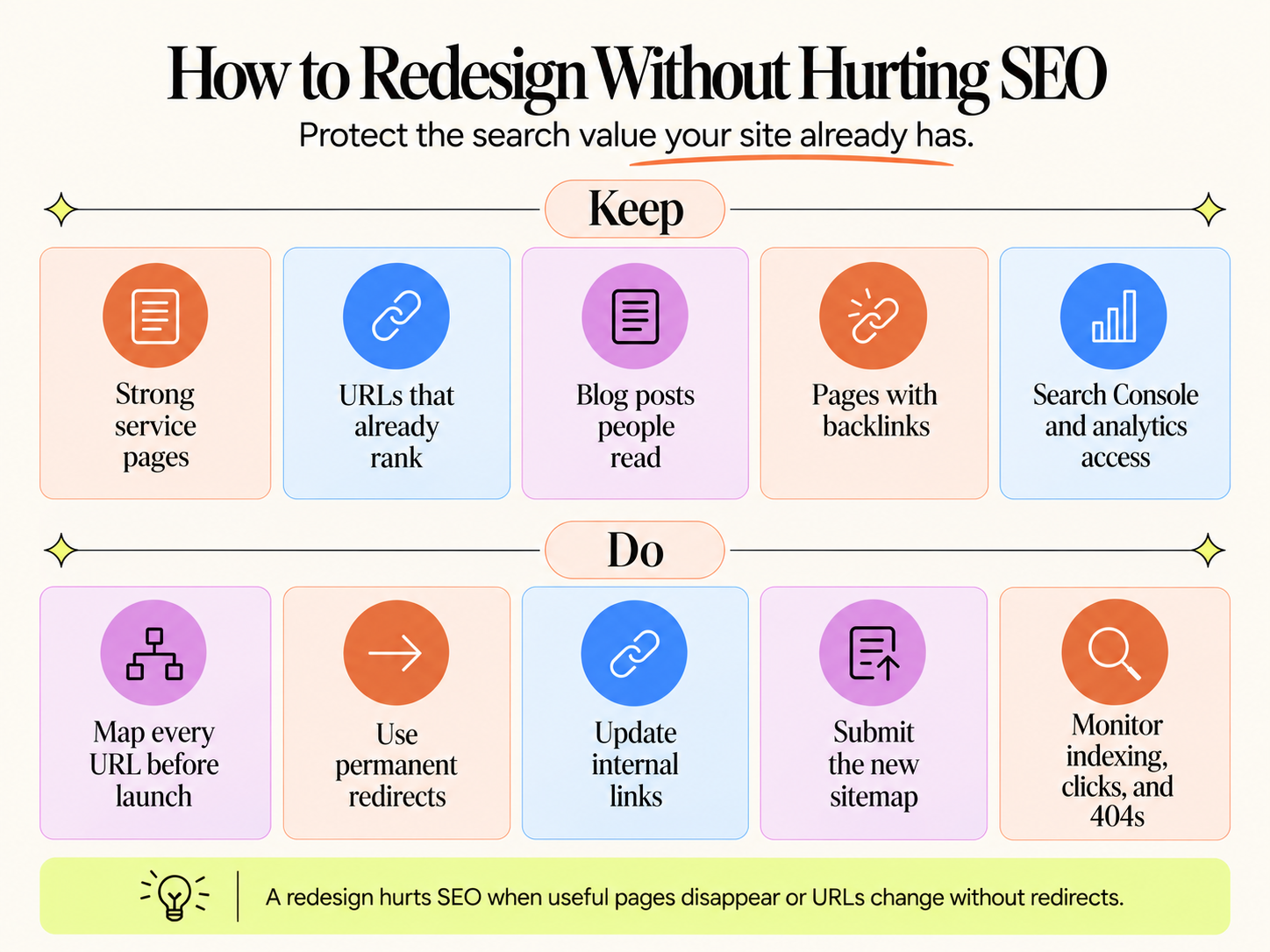
Keep the assets that already bring search value, and map every move before launch.
If your current page lives at /trauma-therapy and the new site still has a trauma therapy page, ask why that URL needs to change at all, because "the new one looks cleaner" is not a reason. When a URL really does need to move, map the old URL to the closest relevant new one, so the old couples page points to the new couples page and the old clinician resource points to the new resource, never to the homepage. Google recommends server-side permanent redirects and warns against sending many unrelated old URLs to one destination.
Before launch
· Export the existing URLs and note which ones receive search traffic
· Record the important search queries and backlinks
· Decide which URLs stay the same and map every one that changes
· Prepare permanent redirects
· Review page titles and canonical URLs
· Update internal links to the new URLs
· Prepare the new sitemap
· Keep Search Console and analytics access
· Check the staging site for leftover noindex and robots settings
After launch
· Test the important redirects
· Inspect key URLs in Search Console and submit the current sitemap
· Monitor indexing, clicks, and impressions
· Check for 404 errors and review canonical selection
· Test the contact forms and booking paths
· Review mobile behavior and Core Web Vitals
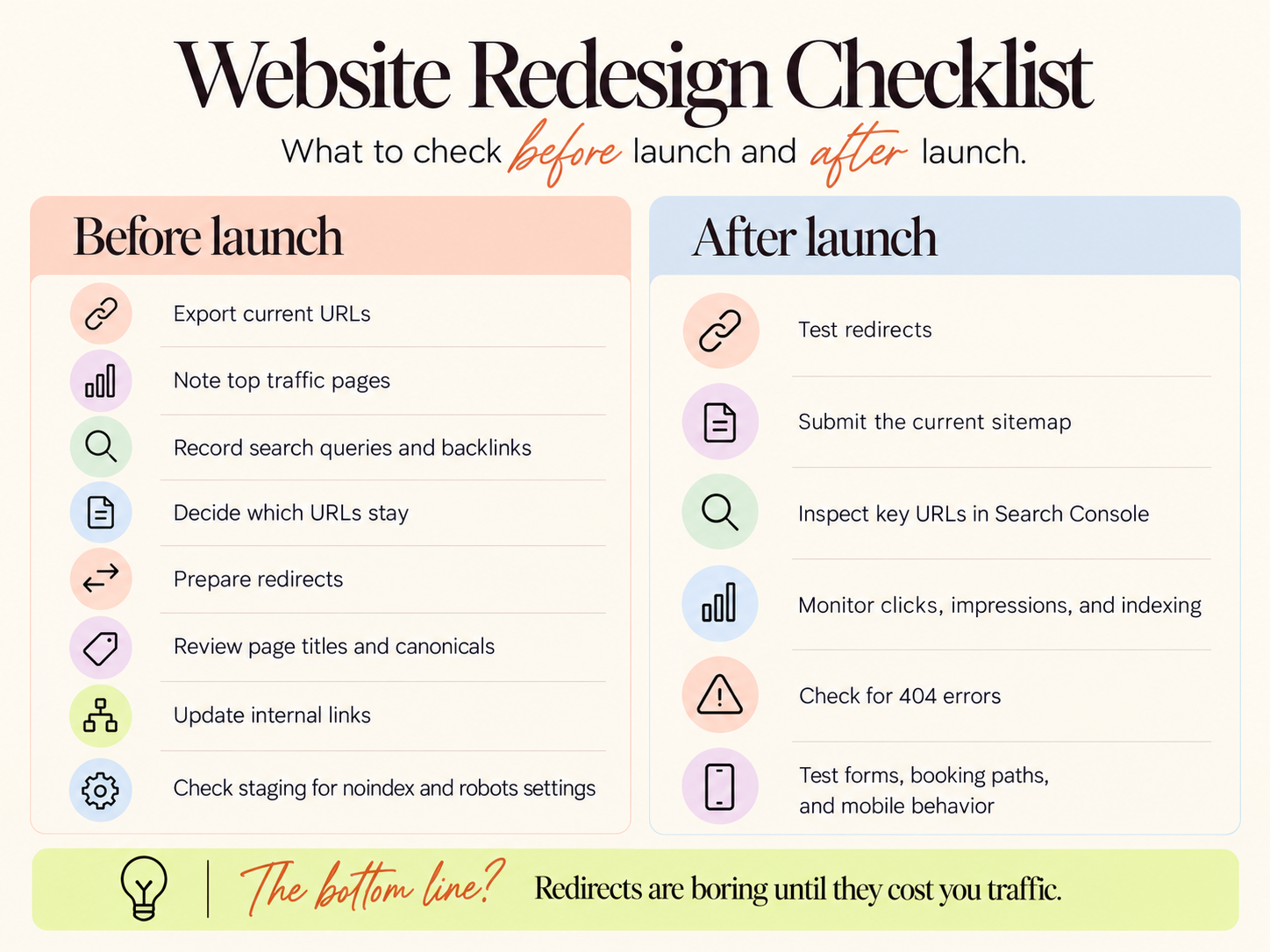
A practical redesign checklist for launch prep and post-launch review.
Google recommends keeping redirects in place for at least a year after a move so its systems have time to transfer signals from the old URLs. Redirects are the least interesting part of a redesign and the part most likely to cost you traffic if they are skipped.
How long does a private practice website redesign take?
There is no useful universal answer, because a five-page copy refresh and a full group practice rebuild are different projects. The timeline depends on whether brand work is included, how many pages there are, how much SEO research the practice needs, the number of clinicians and locations, photography, integrations, a platform migration, redirect work, and how quickly revisions come back.
A good project runs in phases. Strategy and audit first, where we figure out what works now, what is broken, what needs to stay, and what the business is trying to change. Then copy and architecture, deciding which pages are needed, how people move through them, and which searches belong to which page. Then design and build, where the visual work finally has context and supports the words instead of deciding them. Then migration and testing, which covers redirects, mobile, forms, analytics, search settings, and accessibility. Then launch and monitoring, because the project is not finished when the homepage goes live. When you compare proposals, ask what happens during the weeks rather than how many weeks there are, because that answer tells you far more.
What should be included in a project brief for a therapist web developer?
A project brief for a therapist web developer should include who the practice serves and the one experience those clients share, the services and clinicians the site has to represent, every current URL that brings in traffic, the keywords each page needs to rank for, the practice's voice, the platform the site will live on, and who will make edits after launch.
Most briefs I see start with colors, a logo, and a list of pages, and they leave out what decides whether the site brings in clients. Before I design a page, I have a brand voice guide that sounds like the clinician, an ideal client profile built from research into the person she most wants to work with, and keyword research so that client can find her, and I build the website on top of those three. If you are writing a brief for someone else, put those at the top, add the list of URLs and pages that must survive the move, state which platform the site will live on and who will own the account, and name the person on your team who will be making edits afterward, because that answer changes which platform makes sense.
Which website redesign services specialize in therapist practices?
Website redesign services for therapists fall into three groups: subscription website companies that build and host the site inside their own system for a monthly fee, general web designers who build on Squarespace or WordPress and hand the site over, and agencies like mine that pair the build with brand voice, ideal client research, and SEO written by someone who understands therapy. The right one depends on how much you want to own afterward.
A subscription service fits a practice owner who wants the whole thing managed and never wants to log in, and it comes with a monthly fee for the life of the site and contract terms about who owns the copy and the domain if you leave. A general designer fits a practice that already has its positioning and copy figured out and needs the build. The approach I take at The Passive Practice is built for the therapist who wants the strategy, the research, and the writing handled by a clinician who has been on both sides of the consult call, and who wants to control the site herself once it launches.
From The Passive Practice
What I do differently starts before the design. Every project begins with a brand voice guide that actually sounds like you, an ideal client profile built from real research about the person you want to work with rather than the generic clinical version of her, and keyword research so you are visible to her when she goes looking. The website, the clinician pages, and the blog all get built on those three, which is why a site I build for a group practice doesn't read as a template with the names swapped.
The second difference is that the recommendation comes before the scope. The Website Upgrade is for a therapist who already has a site and knows it isn't bringing in the right clients, with the copy rewritten in the practitioner's voice, the design refreshed, and the SEO strengthened. The Semi-Custom Website goes further, and the Custom Website is built from the beginning around your voice, your ideal client, and your goals. On the consult call, I will tell you which one you need, and if the answer is a few fixes you can make yourself, I will tell you that instead.
The third difference is what you keep. The finished site lives in your Squarespace account, and you receive the brand files, graphics, and copy. No retainer is required to keep it running, so the practice can grow without the website becoming a monthly dependency.
Frequently Asked Questions
What are the clear signs a therapy practice website needs an upgrade?
A therapy practice website needs an upgrade when the copy no longer describes your current niche or services, the design looks older than the practice feels, the mobile version is hard to use, and the calls to action don't match the pages they sit on. In contrast, the overall page structure still fits the business. An upgrade rewrites and refreshes your existing structure, while a redesign rebuilds the structure itself.
Which website design features indicate a therapy practice has outgrown its current site?
A therapy practice has outgrown its site when it has one About page for a team of clinicians, one Services page for several service lines, a single booking button for multiple locations, clinician bios with no next step, and a navigation menu that has grown by adding items instead of being rebuilt. Those features show a layout built for one person being stretched over a group.
How often does a therapy website need to be updated?
A therapy website needs small updates whenever something about the practice changes, like a fee, a clinician, or a service, and a larger review about once a year to catch outdated copy, broken links, and search problems. There is no fixed number of years after which a site automatically needs rebuilding.
How can I tell if my counseling site is driving away potential clients?
Your counseling site is driving away potential clients when visitors arrive and leave without contacting you, when new client calls start with questions the site should have answered, and when the contact form, booking path, or mobile layout makes reaching out harder than it needs to be. Search Console and your analytics show the traffic, and the inquiries you are not getting show the rest.
What features should a modern therapist website include for client engagement?
A modern therapist website should include a homepage that speaks to the experience your clients share, a page for each service and each clinician with a next step on it, a clear way to request a consult or book, a contact form that asks only for basic information, a blog answering the questions your ideal client searches, and a mobile layout that works on a phone. Features beyond that help only if the basics are in place.
How do I improve client booking features on a therapist website?
To improve booking on a therapist website, put one consistent next step on every page, link it to a single scheduling tool or your EHR's client portal, keep the request form to a name, contact details, and a short note, and make the button visible without scrolling on a phone. Several different booking paths across the site confuse visitors more than any one of them helps.
You don't have to decide which problem you have on your own
If you are staring at your current site unsure whether it needs a refresh, an upgrade, or a full rebuild, that uncertainty is normal, and it is a bad reason to either overspend or keep patching. On a free consult call, we spend about ten minutes finding the one experience your favorite clients share, and the rest of the time on which problem you actually have before we talk about how much of a website you need. If you would rather start with data, the free SEO audit gives you a personalized report on what the current site is doing in search, written so you can understand it and act on parts of it yourself.
Let me know if you have any questions,
Amanda